An easier sign-in for customers
A first sign-in takes 4–6 seconds: point the camera, tap the link and confirm in the messaging app.
How the sign-in methods compareYour developer or administrator connects Veriqa to your website or app. Your customers then sign in through a messaging app they already have.
A first sign-in takes 4–6 seconds: point the camera, tap the link and confirm in the messaging app.
How the sign-in methods compareYou don't pay for SMS, so the savings grow with the number of sign-ins, and Veriqa itself is open source.
If you turn it on, the sign-in also connects a messenger channel for notifications and approvals.
Veriqa keeps no user directory, and there are no passwords to leak.
Security and data handlingVeriqa is added next to the methods you already have, so nothing has to be replaced at once.
On a computer, a TV or a kiosk it is a QR code; on a phone, a button. The confirmation is always the same tap in the messaging app.
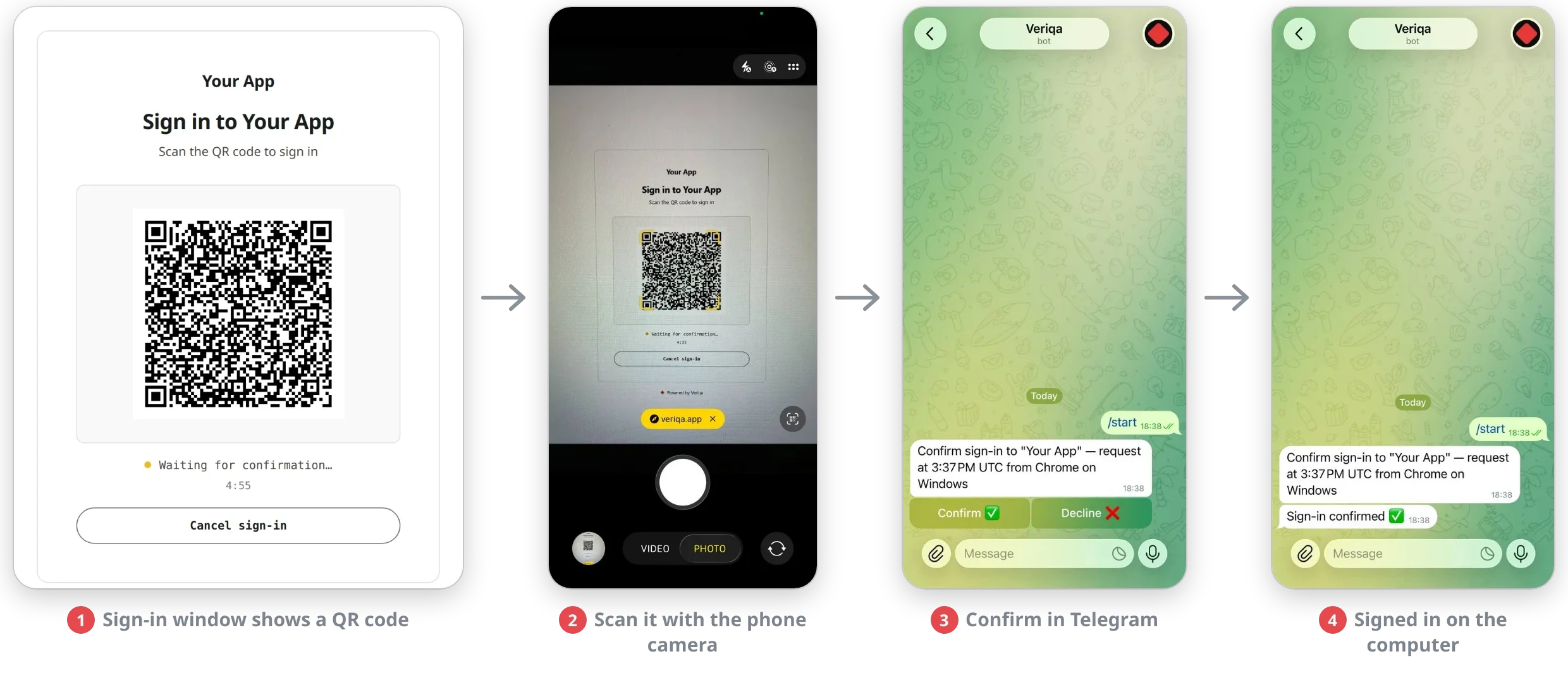
The customer sees a QR code in the sign-in window, points the phone camera at it, opens the link and confirms in the messaging app, and the sign-in on the computer is done. It takes 4–6 seconds, without a single keystroke.
Veriqa is open source and free to connect. This is what a launch takes today.
Deploys Veriqa and connects it to your website or app. Connecting takes 15–30 minutes.
What your developer needsA server at a public HTTPS address, and a bot or a business account in each messaging app you turn on.
CMS. Tested on WordPress, Drupal, Joomla, TYPO3 and Bitrix: Veriqa connects as an ordinary external sign-in method. Learn more — documentation
Cloud soon Veriqa Cloud: no deployment and no maintenance, for websites and products without servers of their own for sign-in.
See the demo first, then pass the details to your developer or write to us.