Email channel
Veriqa signs users in by email in three ways: the one-tap email, a code and a magic link. They can be offered side by side, and you choose which one the sign-in page offers first.
One-tap email
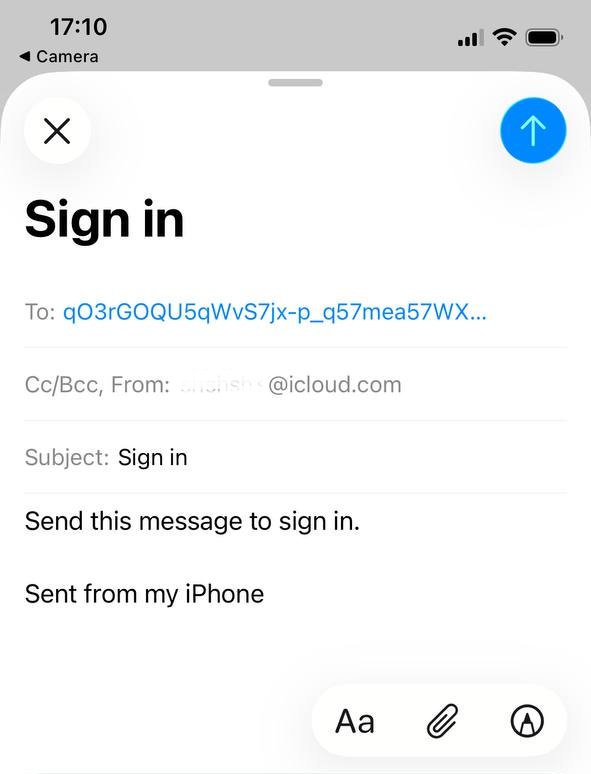
The sign-in page shows a QR code. The user scans it, and the phone opens an email that is already addressed and filled in with a secret token. The user taps Send, and the sign-in completes on the screen. On the same device a button opens the same email.
Why it is better than a code or a link
- Fewer steps: nothing to type and no switching to the mailbox and back.
- No waiting: nothing has to reach the user, so there is no spam folder and no delayed email.
- Proof of the mailbox: sending the email shows that the user controls the mailbox, and the sender is checked against DMARC.
- Nothing for a mail gateway to use up: corporate mail protection opens the links in incoming email, and the email the user sends has none.
- One habit: it is the same secret message the messaging apps use, only as an email.
Code from an email
The user enters their address and gets an email with a six-digit code to enter on the same page. The code is valid for the time the email states, five attempts are allowed by default, and every new email brings a new code.
Magic link
The user enters their address and gets an email with a link. Opening the link does not use it up: the sign-in goes on only after a button on the page is pressed, so a mail gateway that checks links passes nothing on. One email can carry both the link and the code — whichever comes first counts.